Comparison Guide

Seedream 5.0 Pro vs Seedream 5.0 Lite

Seedream 5.0 Pro and Seedream 5.0 Lite are closely related, but they answer different questions. Lite helps users understand the public direction of the Seedream 5.0 model family. Pro is built for people who want to create, edit, refine, and export images from a browser workflow.

This guide compares the two from a practical creator perspective: workflow, image editing, references, 2K and 4K output planning, commercial image production, and when each option makes the most sense.

Seedream 5.0 ProLast updated: June 25, 202610 min read

Quick verdict

The short answer

If you need a finished image workflow, choose Pro. If you are studying public model capabilities, Lite is the useful reference point.

Choose Seedream 5.0 Pro if you want a browser workflow

Seedream 5.0 Pro is designed as a practical workspace for people who want to create, edit, compare drafts, use credits, and export 2K or 4K images without building an API setup. It is the better fit when the task is commercial image work: product heroes, posters, social ads, localized visuals, information layouts, and reference-guided edits.


Choose Seedream 5.0 Lite if you are studying the model family

Seedream 5.0 Lite is best understood as a public model reference for the Seedream 5.0 capability direction. It is useful for learning what the new model family emphasizes, such as reasoning, image understanding, text-to-image generation, image editing, and web search enabled visual creation.

The simplest summary

Lite explains the model direction. Pro turns that direction into an accessible creation workflow. If you are comparing them for daily production, the main difference is not only model quality; it is workflow, credits, export planning, reference handling, and the practical steps around the image.

Detailed comparison

Seedream 5.0 Pro vs Seedream 5.0 Lite feature matrix

This table compares the products by user intent. It does not treat Lite as a full commercial workspace; it treats Lite as a public model reference.

CategorySeedream 5.0 ProSeedream 5.0 Lite
Primary roleBrowser-based AI image generation and editing workspacePublic Seedream 5.0 model reference and capability preview
Best forCreators, marketers, ecommerce teams, designers, and content teams producing finished imagesUsers comparing model capabilities, reading official examples, or studying the Seedream 5.0 direction
WorkflowPrompt, upload references, choose settings, generate, refine, and exportModel capability demonstration focused on what the underlying model can do
Access modelCredit-based web access on this site, with no local install needed for the browser flowModel information and example-based public material from ByteDance Seed
Resolution planning2K drafts and 4K final output planning for production workflowsCapability reference; final export workflow depends on the platform using the model
Image editingPositioned for browser image editing, target changes, reference use, and practical revisionsShows image editing and reasoning capabilities as part of the Seedream 5.0 family
Reference imagesUseful for identity, product shape, style, layout, pose, and lighting controlUseful as a model capability area, especially when examples demonstrate image understanding
Web search contextUseful when prompts need fresh context, topics, products, or knowledge-aware visualsOfficial material highlights search-aware and reasoning-driven use cases
Commercial workflowBuilt around usable creation, credit packs, download planning, and client-ready outputNot a complete commercial workspace by itself

Core explanation

Model reference vs production workflow

The most important difference is where each option sits in the creation process.

What is Seedream 5.0 Pro?

Seedream 5.0 Pro is a browser-based AI image generator and editor built for people who need usable visuals quickly. It focuses on the workflow around image creation: prompt writing, reference uploads, output settings, draft generation, refinement, and final export. That makes it different from a model announcement or a technical capability page. The value of Pro is not only the model name; it is the packaged experience that helps a creator move from an idea to a downloadable image. For marketers, ecommerce operators, designers, educators, and content teams, this workflow matters because the final image has to fit a real channel: ad, website, poster, presentation, social media, or client review.

What is Seedream 5.0 Lite?

Seedream 5.0 Lite is best treated as a public reference point for the Seedream 5.0 model family. ByteDance Seed material describes the capability direction around generation, editing, reasoning, image understanding, and web search supported workflows. Lite is useful when you want to understand the model layer: what tasks it can support, what kinds of examples are shown publicly, and how the new version differs from earlier Seedream releases. It is not the same thing as a full production website with credit packs, export planning, and a simplified creator workflow. That is why the comparison is really about model reference versus production experience.

How should you compare them?

A fair comparison should look at both capability and workflow. If you only ask which one is more powerful, you may miss the practical question: which one helps you finish the image? Lite is useful for capability research. Pro is useful for producing work. A finished creative workflow needs prompt structure, reference control, image editing, resolution choice, export format, and a way to repeat the process. A model reference can show what is possible, but a production page should reduce the friction between idea and usable output. That is the core difference for most users.

Best use cases

When Seedream 5.0 Pro is more useful than Lite

For daily image work, the production workflow around the model is often as important as the model capability itself.

Product and ecommerce visuals

Use Seedream 5.0 Pro when a product image needs a clean hero scene, consistent packaging, readable labels, and enough spacing for a headline or call-to-action. Lite helps you understand the model capability, but Pro is the practical place to plan drafts, choose output settings, and generate deliverables.

Reference-guided creative work

When you need to preserve a person, object, product shape, brand color, pose, or style, Seedream 5.0 Pro gives the workflow around those references. The important difference is that the prompt must describe the job of each reference image. Pro turns that reference logic into a repeatable browser flow.

Knowledge-aware and current visual briefs

Seedream 5.0 Lite public material emphasizes knowledge and reasoning. Seedream 5.0 Pro uses that positioning for real briefs where the image needs structured information, current context, or a visual that explains a concept instead of simply looking beautiful.

Image editing and refinement

If the first result is close but not final, Pro is better framed for revision work. You can preserve successful parts, fix visible problems, and move toward final output. Lite is useful for understanding model capability, but the actual production value comes from the editing process around the model.

Alternatives

Seedream 5.0 Pro alternatives and when Lite is enough

This page is also an alternatives guide. Lite can be useful for research and capability review, while Pro is the better choice when you need a complete browser workflow for production images.

Use Pro when output matters

Choose Seedream 5.0 Pro when you need a browser-based workflow for image creation, prompt refinement, reference handling, 2K drafts, 4K final output, and downloadable commercial visuals.

Use Lite when research is enough

Seedream 5.0 Lite is enough when you are studying the model family, reviewing public examples, comparing capability direction, or deciding whether the Seedream 5.0 generation style fits a future workflow.

Use both when planning a campaign

A practical alternatives workflow is to review Lite examples for capability context, then move to Seedream 5.0 Pro when the brief becomes a real product image, ad, poster, or client-ready creative task.

Workflow

How to use Pro and Lite together

The strongest workflow is not always either-or. Use Lite to understand the model family and Pro to execute the actual image workflow.

01

Start with the output goal

Before choosing Pro or Lite, decide what you are trying to create. If you need a finished asset for an ad, ecommerce page, presentation, social post, product detail page, or client draft, Seedream 5.0 Pro is the natural choice. If you only want to understand what the model family can do, Seedream 5.0 Lite public examples are useful research material. This distinction matters because many users compare models by image quality alone, but production work also depends on how fast you can revise, export, and repeat.

Workflow note

This step is about reducing uncertainty. Understand the model direction first, then use the browser workflow to turn that understanding into a practical image output.

02

Use Lite as a capability reference

Seedream 5.0 Lite helps explain the direction of the Seedream 5.0 model family. The public material points toward image generation, editing, multi-image handling, reasoning, and web search enabled visual creation. It is valuable because it shows the model direction without forcing every reader into a specific product interface. Treat Lite as a way to understand the foundation: what kinds of prompts the model can interpret, what role references may play, and how reasoning-based generation can support more structured briefs.

Workflow note

This step is about reducing uncertainty. Understand the model direction first, then use the browser workflow to turn that understanding into a practical image output.

03

Use Pro as the production workspace

Seedream 5.0 Pro is the page you use when the question is not "what can the model do?" but "how do I make the image I need today?" The workflow is more concrete: write a prompt, upload references, choose 2K or 4K, select aspect ratio, generate a draft, inspect the result, refine the prompt, and export. This makes Pro better for people who need output instead of research. It is also easier to explain to teams because the workflow maps to normal creative production stages.

Workflow note

This step is about reducing uncertainty. Understand the model direction first, then use the browser workflow to turn that understanding into a practical image output.

04

Move from draft to final

A good Pro workflow usually begins with a 2K draft, not a final 4K image. Use the draft stage to test subject, scene, text placement, reference behavior, and layout. Once the image direction is strong, switch to 4K for the final version. This is one of the practical differences between a capability reference and a production page: a production page needs to guide resolution choice, credit use, file type, and delivery context.

Workflow note

This step is about reducing uncertainty. Understand the model direction first, then use the browser workflow to turn that understanding into a practical image output.

Prompt examples

Prompt examples for Seedream 5.0 Pro vs Seedream 5.0 Lite

The examples below compare the same input and prompt direction across Seedream 5.0 Pro and Seedream 5.0 Lite, so users can understand the practical output difference in a same prompt test.

Clay-style cafe ad

Input material
Clay-style cafe ad input reference

Prompt direction

Place them in the scene from image 4, drinking coffee at the same table. Show two people seated together, talking and laughing. Use a clay animation style, with the polished feel of a cafe advertisement.

This is a production prompt for Seedream 5.0 Pro. It uses reference images as input, defines the target scene, controls the mood, and asks for a polished ad-style output.

Seedream 5.0 Pro output
Clay-style cafe ad Seedream 5.0 Pro output
Seedream 5.0 Lite output
Clay-style cafe ad Seedream 5.0 Lite output

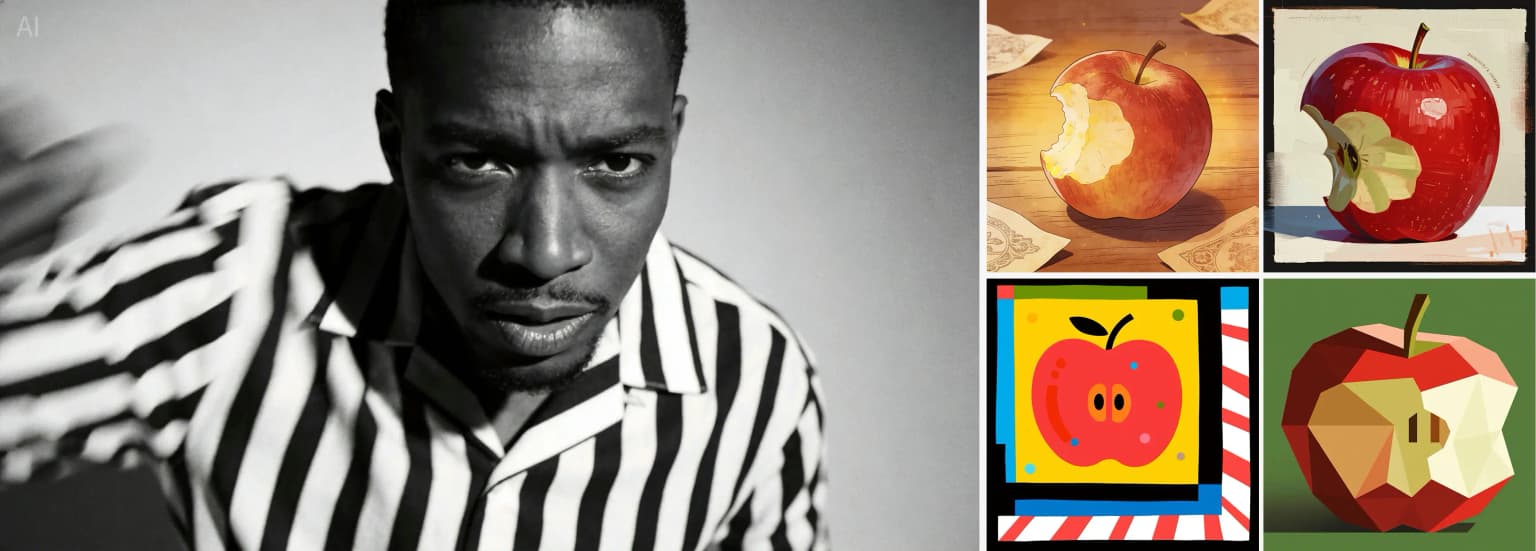
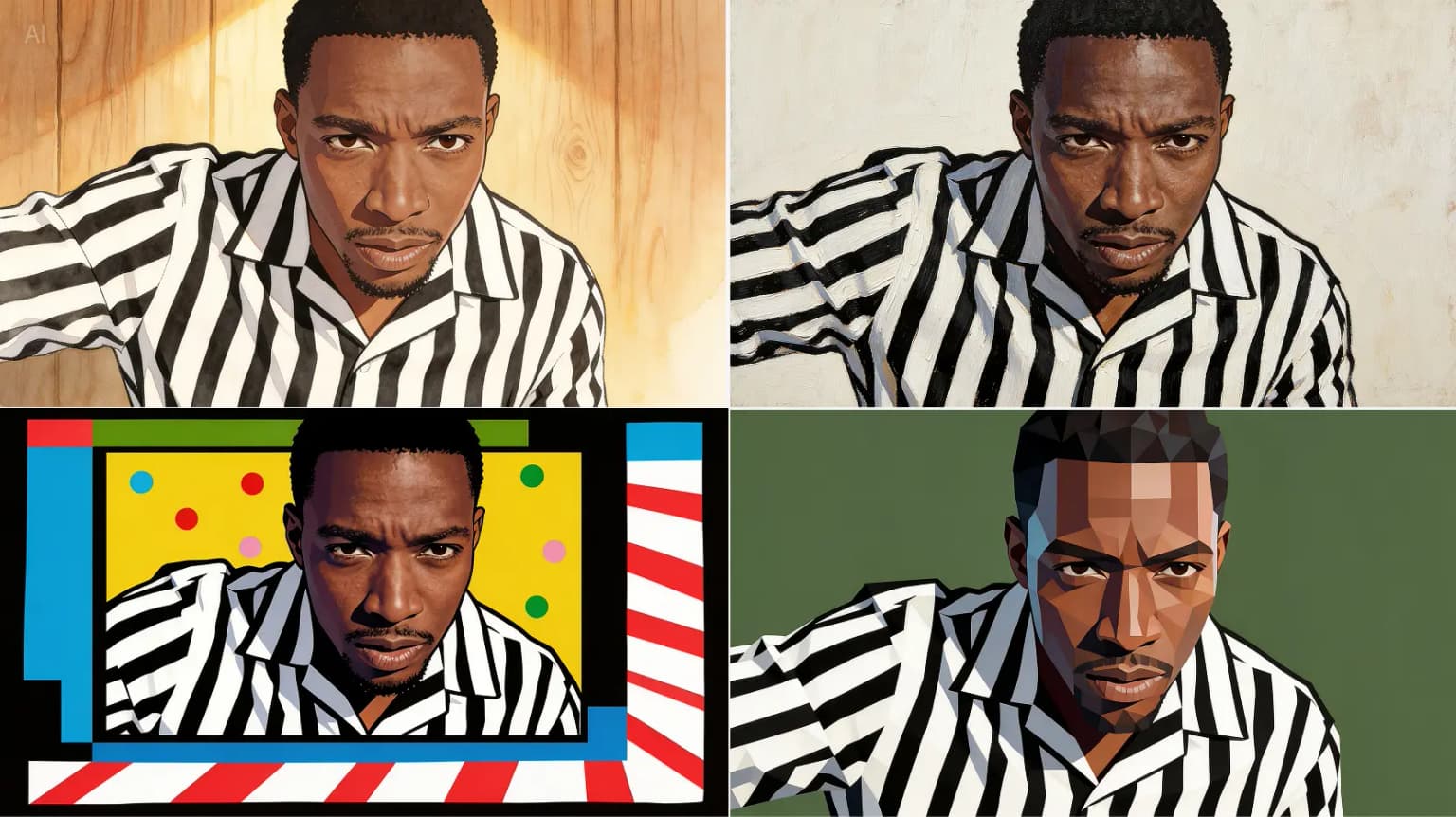
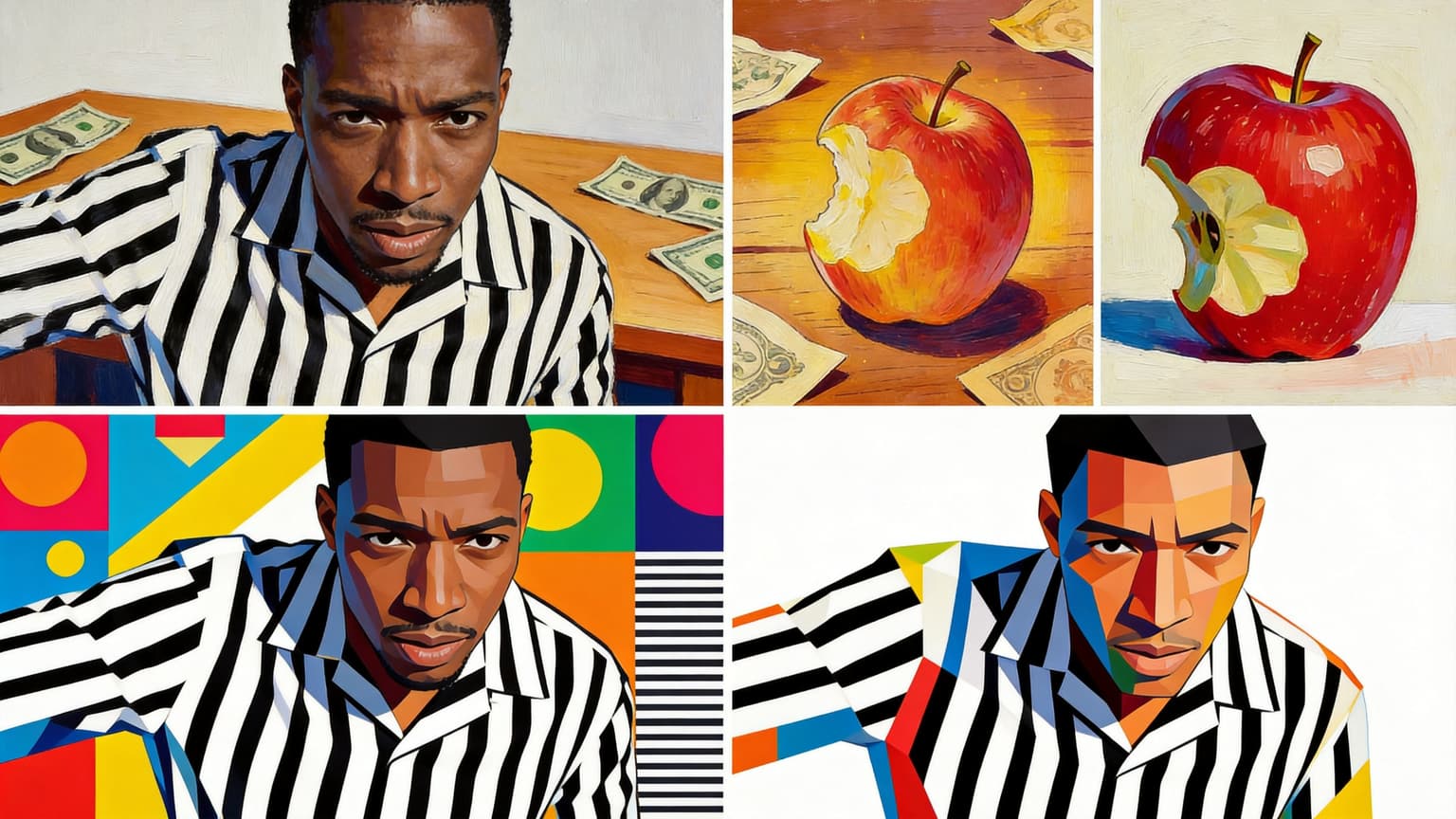
Style transfer set

Input material
Style transfer set input reference

Prompt direction

Use the four style references on the right. Redraw the man in each referenced style and return four matching images, one image for each style. Keep the same male subject while changing only the visual style.

Use this pattern when reference images define multiple target styles while the original subject must stay recognizable.

Seedream 5.0 Pro output
Style transfer set Seedream 5.0 Pro output
Seedream 5.0 Lite output
Style transfer set Seedream 5.0 Lite output

Floral arrangement composite

Input material
Floral arrangement composite input reference

Prompt direction

Create a floral arrangement using the flowers from images 1 to 6. The number of flowers is flexible, and you may add extra leaves or foliage for balance. Place all flowers into the vase from image 7, then put the vase on the table from image 8.

Use this pattern when several references provide separate objects that must be combined into one final scene.

Seedream 5.0 Pro output
Floral arrangement composite Seedream 5.0 Pro output
Seedream 5.0 Lite output
Floral arrangement composite Seedream 5.0 Lite output

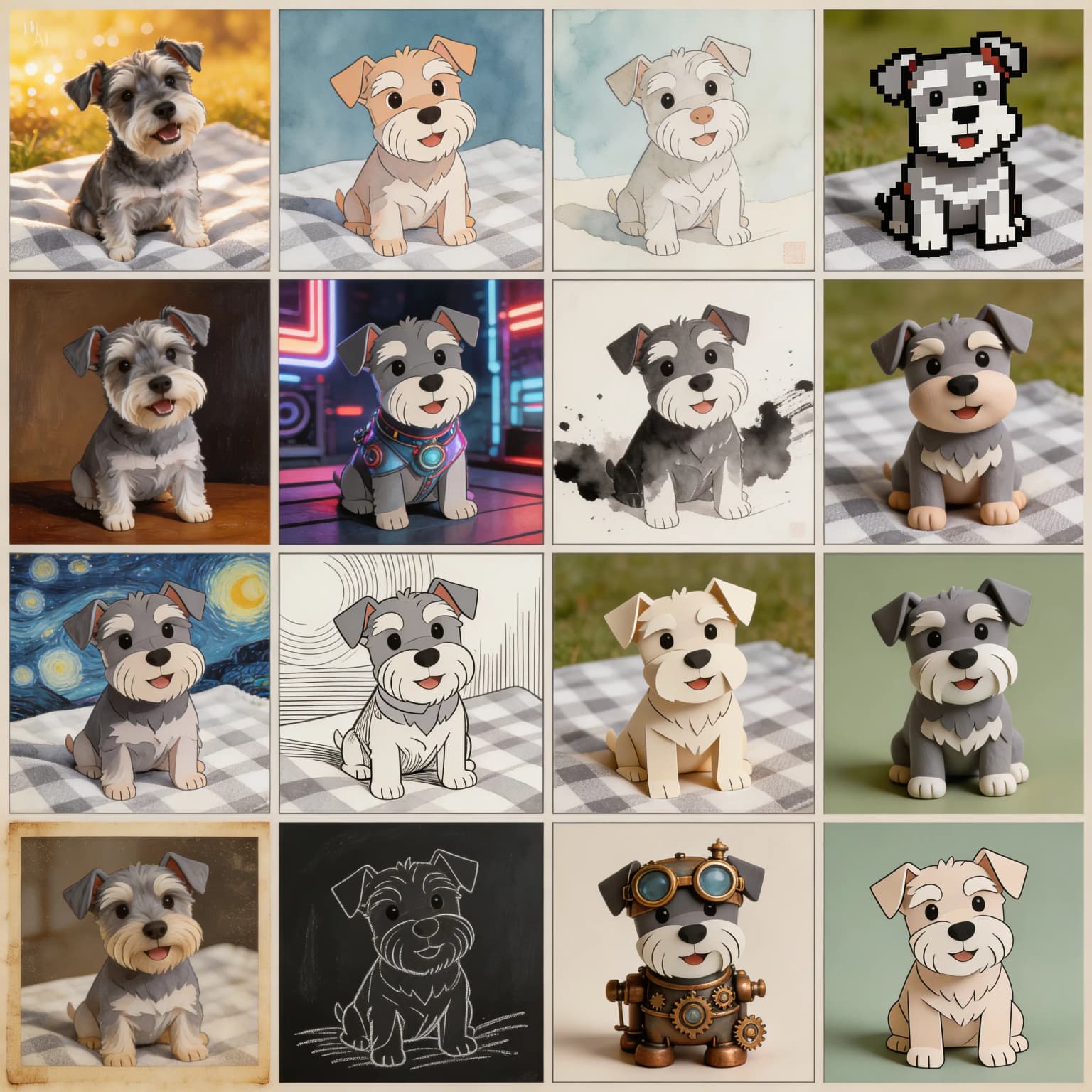
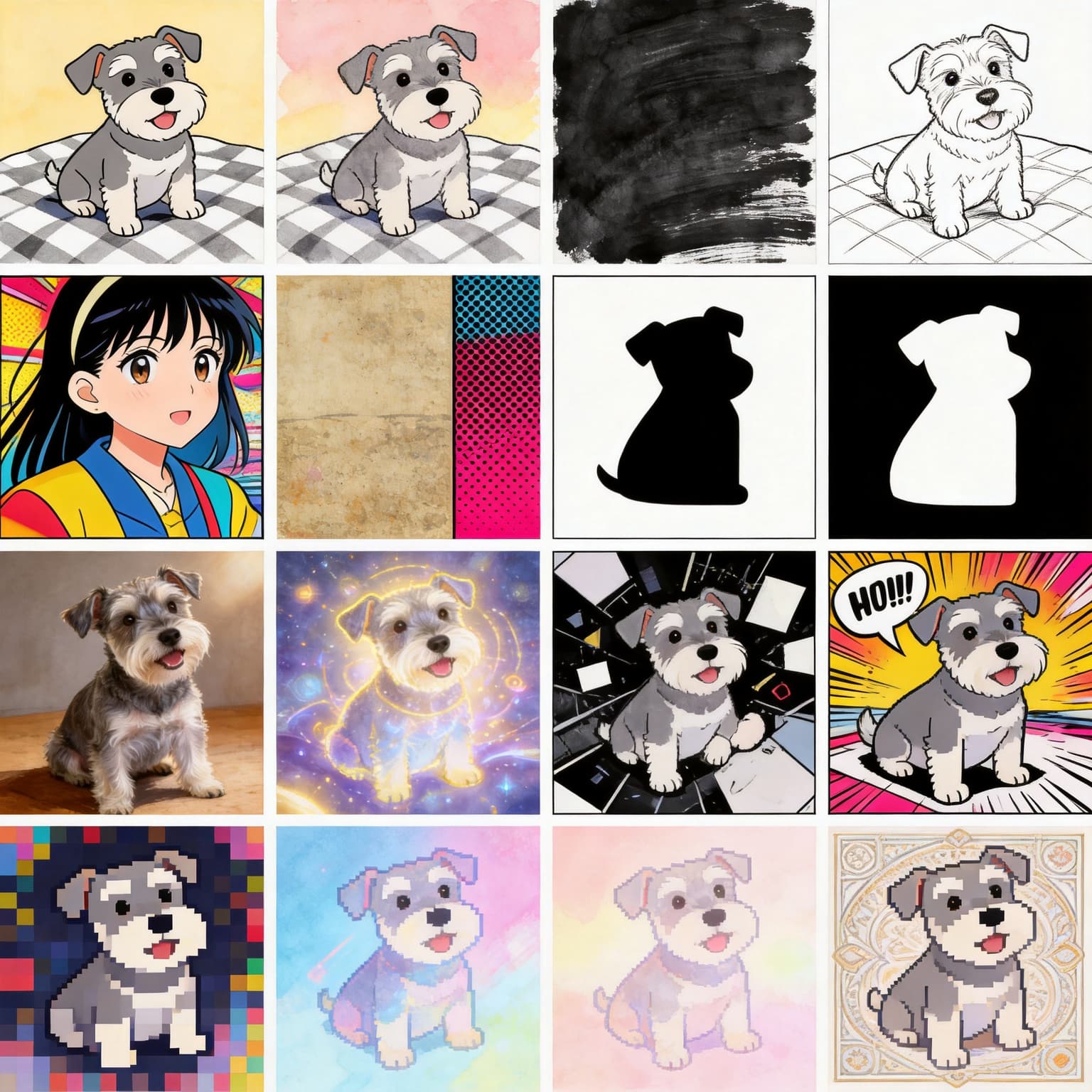
4x4 multi-shot style grid

Input material
4x4 multi-shot style grid input reference

Prompt direction

Generate one multi-shot image containing 16 scenes, divided into a 4x4 grid. In this multi-shot image, change the dog style in each panel, but keep the main subject as the same dog. Return only one final image.

Use this pattern when you want many style variations in a single structured output while preserving the same subject.

Seedream 5.0 Pro output
4x4 multi-shot style grid Seedream 5.0 Pro output
Seedream 5.0 Lite output
4x4 multi-shot style grid Seedream 5.0 Lite output

Methodology

How this comparison was written

The page compares Pro and Lite by public positioning, model-reference material, and practical creator workflow.

The comparison uses public Seedream 5.0 Lite material from ByteDance Seed, public commentary from AI image generation guides, and the current Seedream 5.0 Pro website workflow. Because product features can change, the safest way to read this page is as a workflow comparison rather than a permanent benchmark. The core recommendation is based on user intent: Lite is useful for studying the model family, while Pro is useful for creating and exporting images through a browser workflow.

FAQ

Seedream 5.0 Pro vs Seedream 5.0 Lite FAQ

Short answers for users comparing the model reference with the production workflow.

Is Seedream 5.0 Pro the same as Seedream 5.0 Lite?

No. Seedream 5.0 Lite is best understood as a public reference for the Seedream 5.0 model family, while Seedream 5.0 Pro is positioned as a browser workflow for generating, editing, refining, and exporting images. They are related by model direction, but they solve different user problems.

Which one should I use for commercial images?

Use Seedream 5.0 Pro if your goal is a finished commercial asset. Pro is built around prompts, references, settings, drafts, revisions, and final downloads. Lite is useful for understanding model capabilities, but it is not the complete production workflow by itself.

Why does Seedream 5.0 Lite matter?

Lite matters because it shows the direction of the Seedream 5.0 model family. Public examples and descriptions help users understand reasoning, image understanding, search-aware generation, editing, and multi-image capability before choosing a practical workflow.

Does Seedream 5.0 Pro support 2K and 4K output?

The Seedream 5.0 Pro workflow on this site is designed around 2K drafts and 4K final images. Use 2K for prompt testing and direction finding, then move to 4K when the composition, text, and reference behavior are ready for production.

Can I use both Pro and Lite in the same decision process?

Yes. A smart workflow is to read Lite materials to understand what the model family emphasizes, then use Pro when you are ready to create a real image. Lite helps with evaluation. Pro helps with execution.

Try Seedream 5.0 Pro for production images

Use Lite material to understand the model family, then open Seedream 5.0 Pro when you are ready to create, edit, refine, and export images.