Comparison Guide

Seedream 5.0 Pro vs GPT Image 2

Seedream 5.0 Pro and GPT Image 2 can both support AI image generation and editing, but they fit different workflows. Seedream 5.0 Pro is a focused browser workspace. GPT Image 2 is an OpenAI model path for ChatGPT and API-connected image work.

This guide compares them by workflow, references, text in images, output planning, commercial use, and how to test both options with the same prompt.

Seedream 5.0 ProLast updated: June 30, 20268 min read

Quick verdict

The short answer

Choose Seedream 5.0 Pro for a focused Seedream browser workflow. Choose GPT Image 2 when OpenAI access, ChatGPT, or API integration is the main requirement.

Choose Seedream 5.0 Pro for a focused browser workflow

Seedream 5.0 Pro is the better fit when you want a direct image creation page for prompts, references, 2K drafts, 4K final output, credit packs, and commercial creative work without building an API workflow.
Choose GPT Image 2 for OpenAI-native image work

GPT Image 2 is a strong choice when your team already uses OpenAI, wants image generation inside ChatGPT or API workflows, or needs model access that can be built into another product.

The practical difference

The comparison is not only model quality. It is where the work happens. Seedream 5.0 Pro is a focused production page. GPT Image 2 is an OpenAI model path for users and developers who want OpenAI-connected image generation and editing.

Detailed comparison

Seedream 5.0 Pro vs GPT Image 2 feature matrix

This table compares the two options by user intent and production workflow, not by unsupported quality rankings.

CategorySeedream 5.0 ProGPT Image 2
Primary roleBrowser-based Seedream image generator and editorOpenAI image generation and editing model
Best forCreators, marketers, ecommerce teams, designers, and small teams producing finished visualsOpenAI users, ChatGPT users, developers, and teams building image workflows into products
WorkflowPrompt, upload references, select settings, generate, refine, and export from a focused web pageUse through OpenAI product or API surfaces, depending on access path
Reference imagesUseful for product shape, identity, style, layout, pose, and lighting controlOpenAI documentation positions GPT Image 2 with high-fidelity image input support
Text in imagesUseful for posters, labels, ad variants, and multilingual layouts in a Seedream-focused workflowOpenAI highlights improved text rendering and multilingual support in its image work
Resolution planningClear 2K draft and 4K final output planning on this siteFlexible image sizes are documented for GPT Image 2 API usage
Commercial workflowCredit packs, pricing page, refund policy, and support email are visible on this siteCommercial use depends on the OpenAI product surface, account, policy, and API setup used
When to chooseYou want a practical Seedream page for finished image productionYou want OpenAI model access, ChatGPT-connected image work, or API integration

Best use cases

When each option makes sense

The right choice depends on whether you need a ready creation page or an OpenAI-connected model workflow.

Product and ecommerce visuals

Use Seedream 5.0 Pro when you need a product image workflow with references, draft testing, and final export planning. Use GPT Image 2 when your team wants product image generation inside an OpenAI workflow or needs an API path.

Developer-led image products

GPT Image 2 can be the better fit when a developer needs model access for a custom tool, internal product, or automated image pipeline. Seedream 5.0 Pro is simpler when the buyer wants a ready browser page instead of implementation work.

Ad, poster, and social variants

Both options should be tested with the same prompt: headline space, CTA area, product position, aspect ratio, and text constraints. The winning workflow is the one that reaches a usable campaign image with fewer revisions.

Core explanation

Model path vs production workspace

Seedream 5.0 Pro and GPT Image 2 can overlap in image generation, but they are not the same kind of buying decision.

What is Seedream 5.0 Pro in this comparison?

Seedream 5.0 Pro should be understood as a practical browser workflow for people who want to create finished images from prompts and references. The page is built around the steps a creator actually takes: write a prompt, upload visual references, choose output settings, generate a draft, inspect the result, refine the prompt, and export a usable file. That makes Seedream 5.0 Pro easier to evaluate for marketers, ecommerce teams, designers, and content teams who do not want to build a custom image pipeline before they can make a poster, product hero, or social creative.

What is GPT Image 2 in this comparison?

GPT Image 2 should be understood as an OpenAI image generation and editing model path. It is useful when the buyer already works with ChatGPT, OpenAI accounts, or OpenAI API tools. For some teams, that is exactly the right fit because image generation needs to connect with a larger product, internal workflow, or developer-led process. For other users, the extra model and platform context can be more than they need. They may only want a direct page where they can test references, compare drafts, and download images.

The real difference is workflow ownership

The most useful way to compare Seedream 5.0 Pro vs GPT Image 2 is to ask who owns the workflow. If a creator owns the workflow, Seedream 5.0 Pro is easier to explain: open the page, write the brief, upload references, generate, revise, and export. If a developer or OpenAI-heavy team owns the workflow, GPT Image 2 may be easier to connect to existing systems. This is why a fair comparison should not stop at output quality. It should include where prompts are written, where files are stored, who repeats the process, and how quickly a draft becomes a final asset.

Testing workflow

How to test Seedream 5.0 Pro vs GPT Image 2 fairly

Use the same prompt, same reference material, and same revision request. Otherwise the comparison becomes a style preference instead of a workflow test.

01

Run one product prompt in both tools

Start with a product image because product accuracy exposes weak workflows quickly. Use the same reference image, the same aspect ratio, and the same instructions about label placement, lighting, background, and text area. Compare whether Seedream 5.0 Pro and GPT Image 2 keep the product recognizable after the first draft.

02

Ask for one specific revision

The second step matters more than the first draft. Ask both workflows to keep the product but change the background, increase the headline space, or move the subject to one side. A good production workflow should preserve the useful parts of the first image while changing only the part you named.

03

Score export readiness, not just beauty

A good-looking image can still fail if the text is unreadable, the product shape is wrong, or the layout cannot fit a real ad placement. Score each result by reference accuracy, text readability, composition, revision control, final size, and the number of attempts needed before the image can be used.

Commercial decision

Pricing, ownership, and production planning

The better option is the one that fits how your team actually buys, repeats, revises, and publishes images.

Choose Seedream 5.0 Pro when the buyer is a creator

Seedream 5.0 Pro is a better fit when the person making the decision is also the person producing the asset. A creator does not want to think about API setup, model routing, or product integration. They want to know whether the image can be made today, whether the prompt examples are useful, whether references are easy to test, and whether the final output fits the channel where the image will be published.

Choose GPT Image 2 when the buyer needs OpenAI integration

GPT Image 2 is a better fit when the image workflow is part of a larger OpenAI setup. That might mean a product team building image generation into an app, a developer automating image creation, or a team that already uses ChatGPT for ideation, writing, and visual drafts. In that case, the OpenAI path can reduce tool switching and give the team more control over how image generation connects to other systems.

Compare cost by usable output, not by one generation

For commercial work, the useful cost is not only the price of one generation. It is the cost of reaching one image that can be published. If one workflow needs five attempts to fix text and another needs two attempts, the cheaper-looking option may not be cheaper in practice. When comparing Seedream 5.0 Pro vs GPT Image 2, track the number of drafts, the number of revisions, and the time required to reach a final file.

Prompt examples

Prompt examples for Seedream 5.0 Pro vs GPT Image 2

The input material and Seedream 5.0 Pro output are reused from the existing comparison set. GPT Image 2 outputs are shown with the provided same-prompt comparison assets.

Clay-style cafe ad

Input material
Clay-style cafe ad input reference

Prompt direction

Place them in the scene from image 4, drinking coffee at the same table. Show two people seated together, talking and laughing. Use a clay animation style, with the polished feel of a cafe advertisement.

This prompt tests reference use, scene transfer, character placement, and ad-style polish.

Seedream 5.0 Pro output
Clay-style cafe ad Seedream 5.0 Pro output
GPT Image 2 output
Clay-style cafe ad GPT Image 2 output

Style transfer set

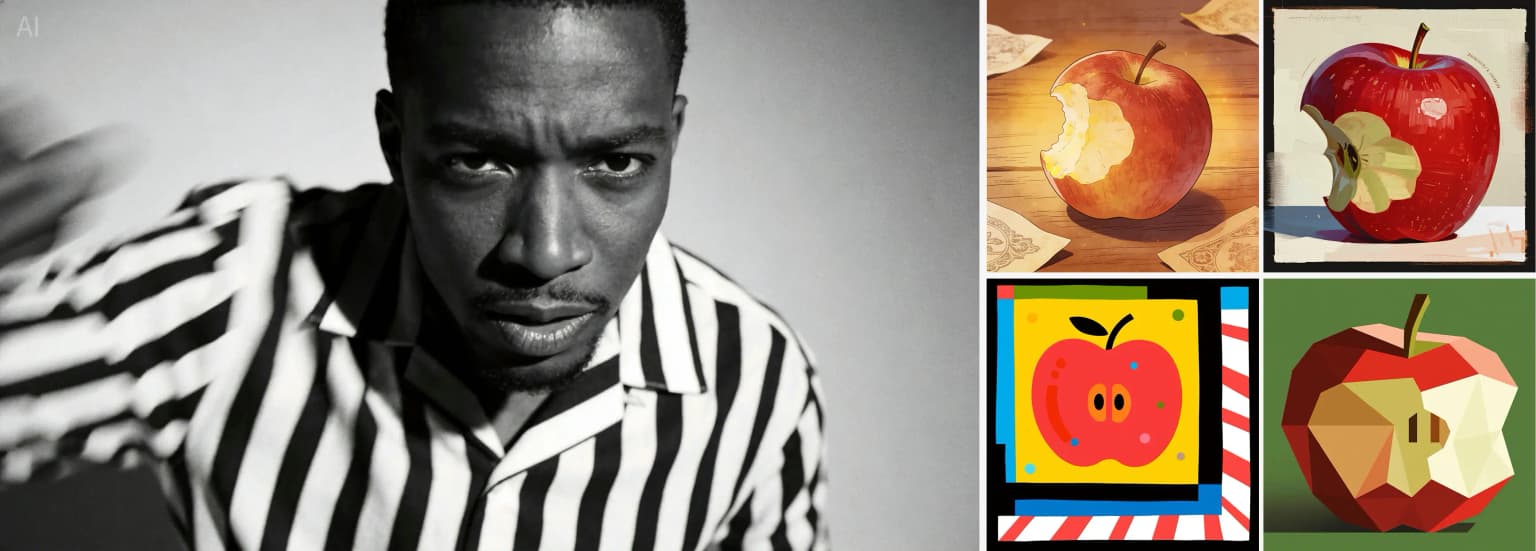
Input material
Style transfer set input reference

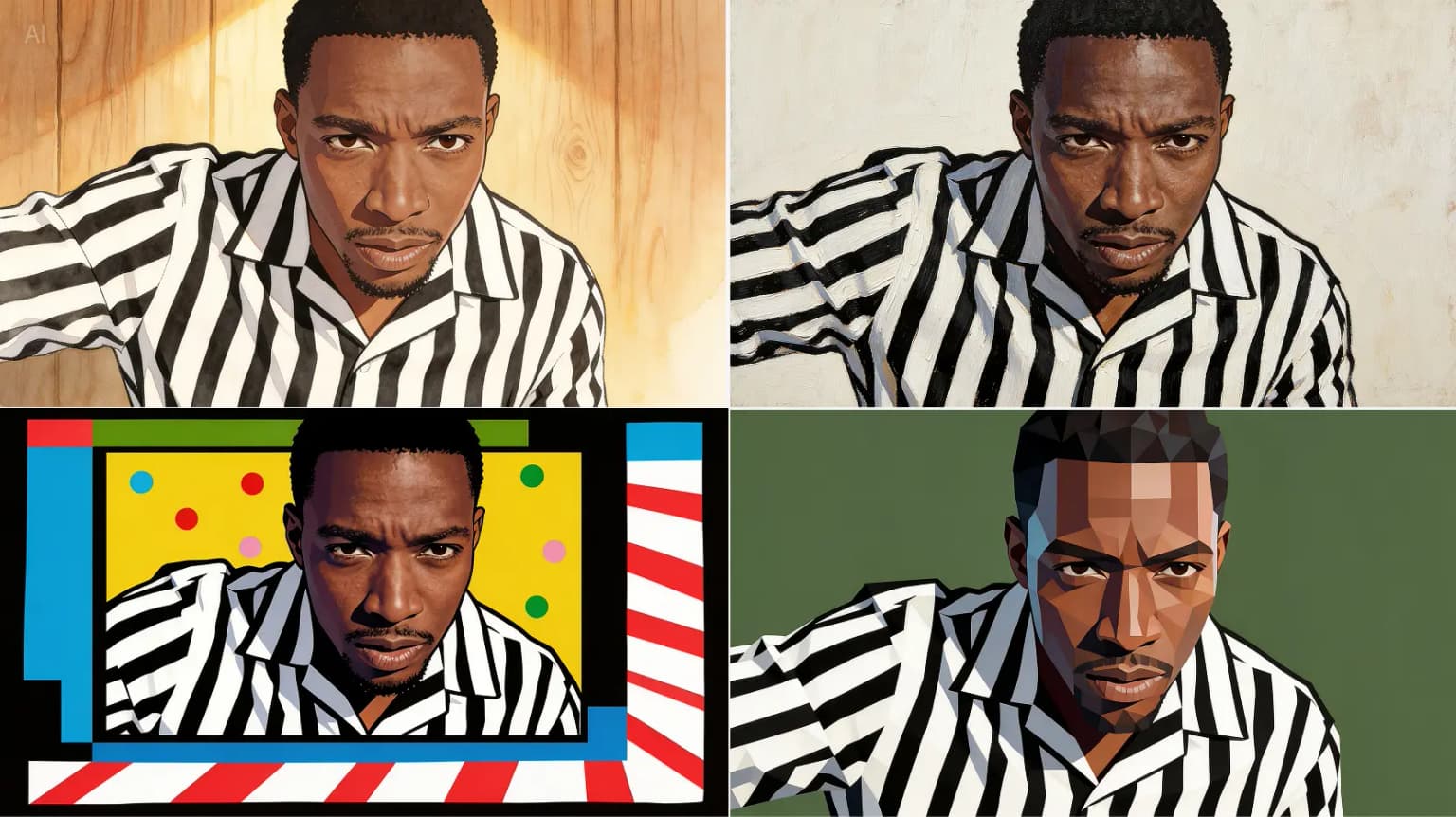
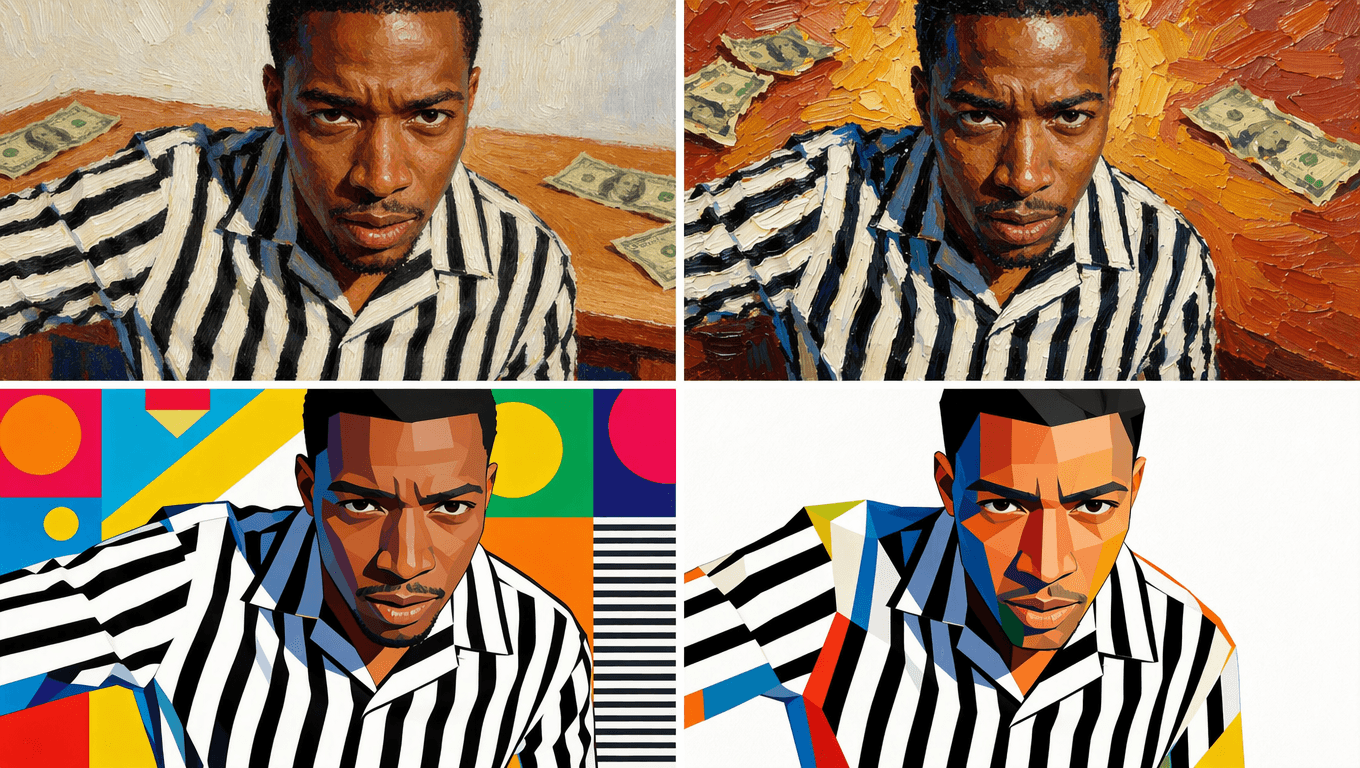
Prompt direction

Use the four style references on the right. Redraw the man in each referenced style and return four matching images, one image for each style. Keep the same male subject while changing only the visual style.

This prompt tests whether the tool can follow multiple style references while preserving the same subject.

Seedream 5.0 Pro output
Style transfer set Seedream 5.0 Pro output
GPT Image 2 output
Style transfer set GPT Image 2 output

Floral arrangement composite

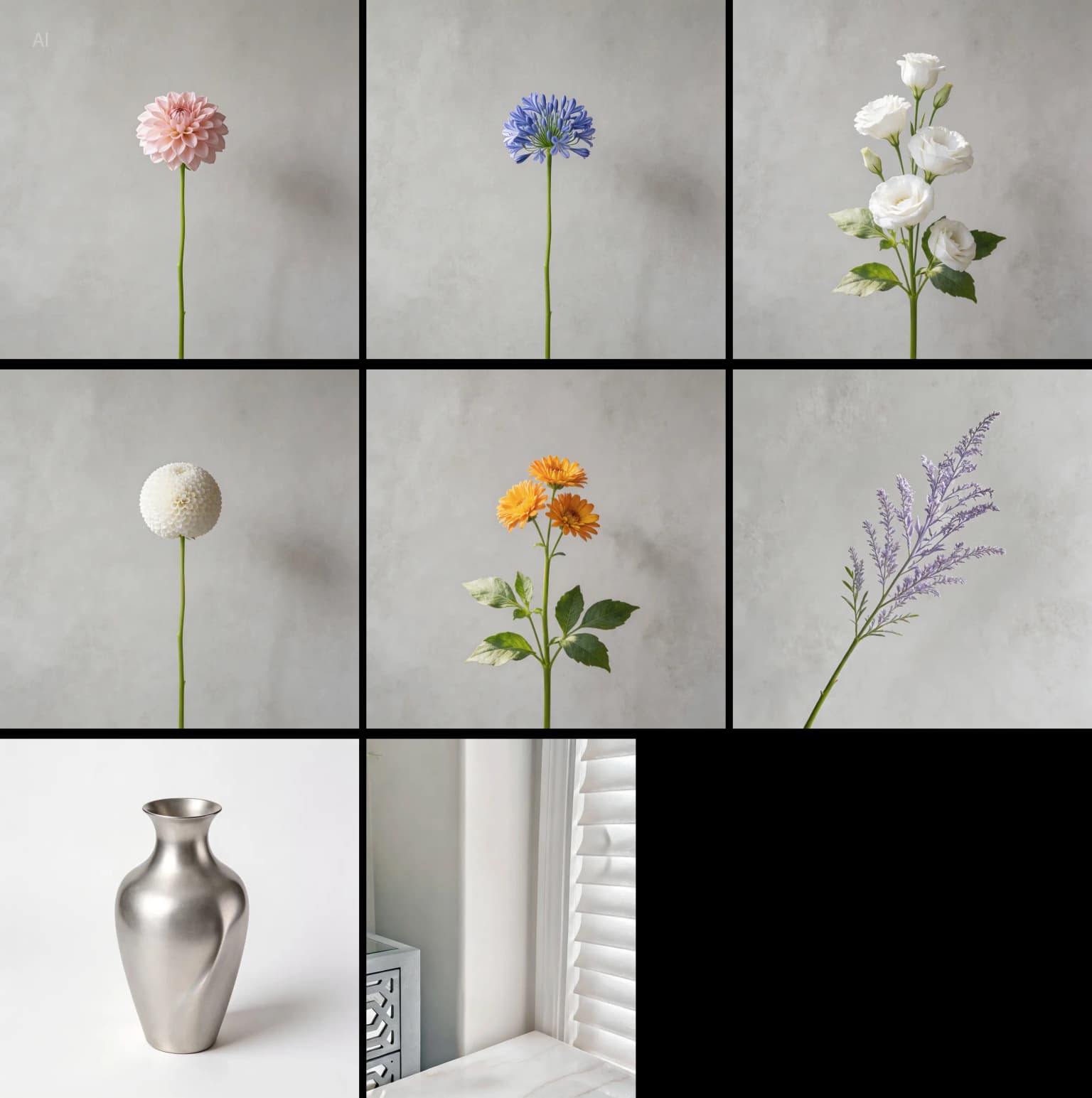
Input material
Floral arrangement composite input reference

Prompt direction

Create a floral arrangement using the flowers from images 1 to 6. The number of flowers is flexible, and you may add extra leaves or foliage for balance. Place all flowers into the vase from image 7, then put the vase on the table from image 8.

This prompt tests object composition, reference selection, and final scene construction.

Seedream 5.0 Pro output
Floral arrangement composite Seedream 5.0 Pro output
GPT Image 2 output
Floral arrangement composite GPT Image 2 output

FAQ

Seedream 5.0 Pro vs GPT Image 2 FAQ

Short answers for users comparing a focused Seedream workflow with an OpenAI image model path.

Is Seedream 5.0 Pro better than GPT Image 2?

It depends on the workflow. Seedream 5.0 Pro is better when you want a focused browser page for Seedream-style image generation, editing, credits, and export planning. GPT Image 2 is better when you want OpenAI-native image generation, ChatGPT-connected image work, or API integration.

Which tool should I use for commercial images?

Use Seedream 5.0 Pro when you want a visible pricing and credit workflow for finished assets on this site. Use GPT Image 2 when your commercial workflow already depends on OpenAI accounts, API access, or ChatGPT image generation.

How should I test Seedream 5.0 Pro vs GPT Image 2?

Run the same product prompt, reference-guided edit, poster prompt, and multilingual text prompt in both workflows. Compare the first draft, one revision, text readability, reference preservation, export readiness, and total effort.

Does GPT Image 2 replace Seedream 5.0 Pro?

Not for every user. GPT Image 2 can replace part of the model layer for OpenAI users, but Seedream 5.0 Pro remains a focused Seedream browser workflow for people who want to generate and refine images without building around an API.

Test Seedream 5.0 Pro with your own GPT Image 2 prompt

Use the same brief in both workflows, then compare the first draft, one revision, and the final file you would actually publish.