Overall fit
4.4/5
Strong for creators who want a focused browser workflow for high-quality AI image generation and editing.
Editorial review
This Seedream 5.0 Pro review looks at the current browser workflow, prompt examples, reference-guided outputs, pricing structure, limitations, and alternatives so you can decide whether it fits your image work.
The short answer: Seedream 5.0 Pro is worth testing if you need production-style AI images, product visuals, posters, social ads, multilingual layouts, or reference-guided edits without building an API setup.
Quick verdict
This scorecard is an editorial fit score for creators and small teams. It is based on current product pages, visible workflows, example outputs, pricing pages, and comparison assets.
Overall fit
4.4/5
Strong for creators who want a focused browser workflow for high-quality AI image generation and editing.
Prompt following
4.3/5
Best when the brief includes subject, intent, layout, references, style, and constraints.
Reference workflow
4.5/5
Useful for product visuals, style transfer, composite scenes, and repeatable creative directions.
Commercial value
4.2/5
Works well when credits are planned around 2K drafts and final export assets.
Seedream 5.0 Pro is strongest for people who want to create finished images in a browser: product visuals, poster concepts, campaign assets, information graphics, social posts, and reference-guided edits. It is less ideal if your main requirement is API-first control, automated generation at scale, or a pure model research workflow.
Review method
The review uses visible product information and current site workflows. It does not invent private generation counts, customer quotes, or unsupported benchmark claims.
We reviewed the current Seedream 5.0 Pro website workflow, pricing structure, example outputs, prompt guide, how-to page, and comparison pages. This is an editorial product review, not a lab benchmark with hidden generation counts.
The review uses available same-prompt image assets across product-style examples, reference-guided edits, and competitor comparison pages. That makes the review useful for real buying decisions without inventing unsupported test claims.
The scoring focuses on whether a creator can produce usable visuals: product posters, ecommerce images, social ads, multilingual layouts, and information-rich graphics. Beauty alone is not enough if the image is hard to revise or export.
Hands-on review notes
These notes explain how to read the example outputs like a buyer, not only like a viewer. The goal is to judge whether Seedream 5.0 Pro can support repeatable creative work.
In the strongest Seedream 5.0 Pro examples, the prompt does not win because it is long. It wins because every sentence has a job. The cafe example names the source scene, the people, the action, the emotional tone, and the commercial style. The floral example explains which input images provide flowers, which image provides the vase, and which image controls the table setting. That level of role assignment is what makes the workflow useful for real production work. A weak prompt such as "make a beautiful cafe ad" may still create an attractive image, but it gives the model too much freedom and gives the user less control over what needs to stay consistent.
The clearest review takeaway is that Seedream 5.0 Pro should be judged as a reference-guided creative workflow, not only as a text-to-image model. The input material blocks are important because they show whether the tool can preserve a visual idea while changing the final composition. This matters for product campaigns, social ads, character concepts, presentation visuals, and brand work where the first image is rarely created from nothing. If your work depends on keeping a product shape, repeating a character, borrowing a style reference, or combining several source images into one output, this is where Seedream 5.0 Pro becomes more useful than a casual image generator.
For paid creative work, the practical question is not whether one lucky generation looks good. The question is how quickly a user can reach an image that is close enough to publish, hand to a designer, or send to a client. Seedream 5.0 Pro is easier to control when the user treats 2K output as a review stage and high-quality output as the final stage. First test the subject, layout, background, lighting, text area, and reference usage. Then use the final output size only after the composition is stable. This keeps credit usage more predictable and makes the review process less random.
Seedream 5.0 Pro can produce polished commercial-looking images, but it should not be treated as a publish button for every asset. Text in images, product details, hand positions, logos, small labels, and dense infographic layouts still need human inspection. The tool is strongest when a creator uses it to reach a high-quality draft quickly, then checks the final details against the real channel: ecommerce listing, ad creative, product page, presentation slide, or social post. That final review step is especially important when the image represents a real product, a client brand, or a paid campaign.
Real output examples
These examples show the kind of work Seedream 5.0 Pro is built for: reference use, product-style composition, ad-like polish, and multi-image creative control.
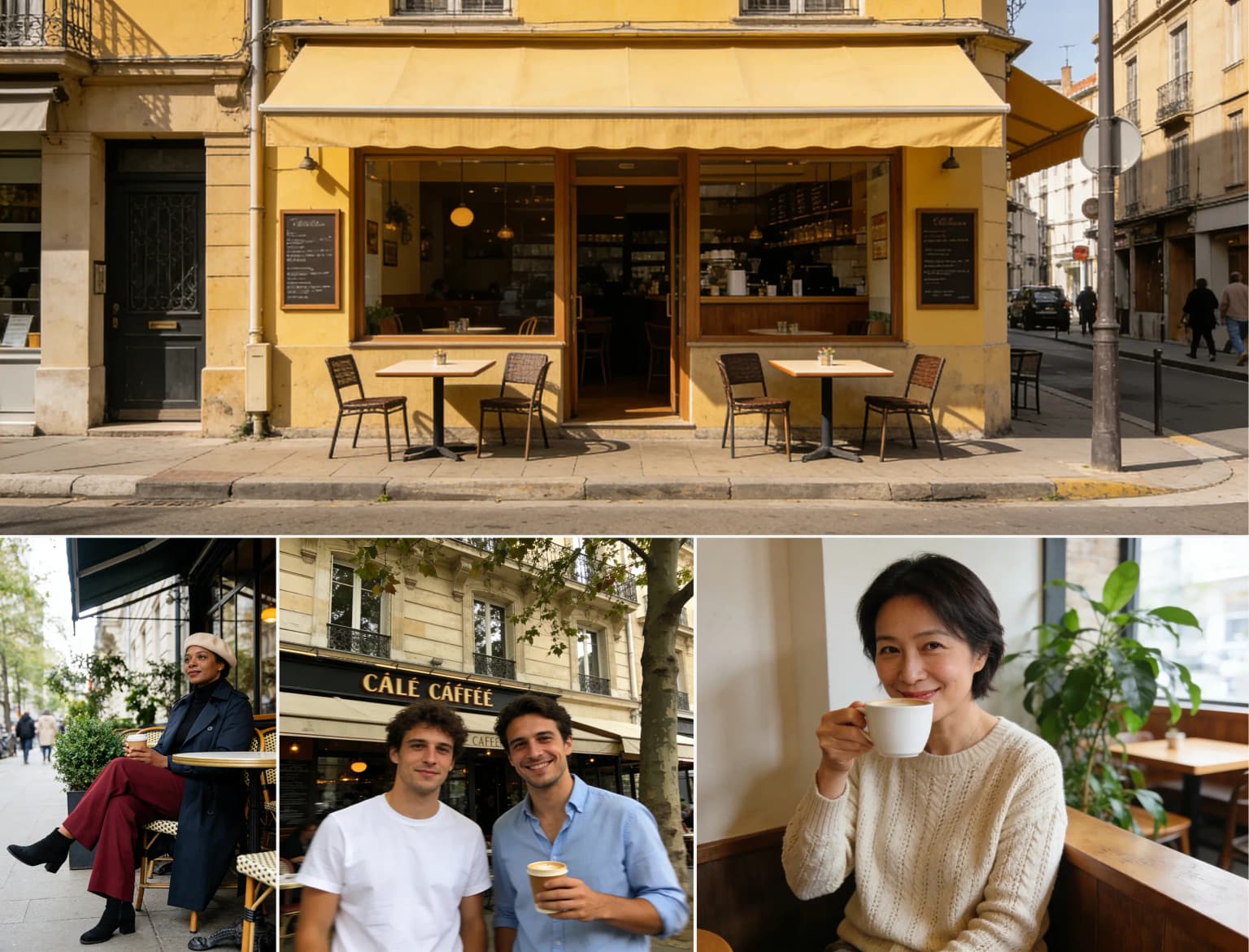
Prompt reviewed
Place them in the scene from image 4, drinking coffee at the same table. Show two people seated together, talking and laughing. Use a clay animation style, with the polished feel of a cafe advertisement.

Review note
This is a good test for reference use, scene transfer, character placement, and ad-style polish. It shows why Seedream 5.0 Pro is strongest when the user gives the model a clear target scene and a clear commercial purpose.
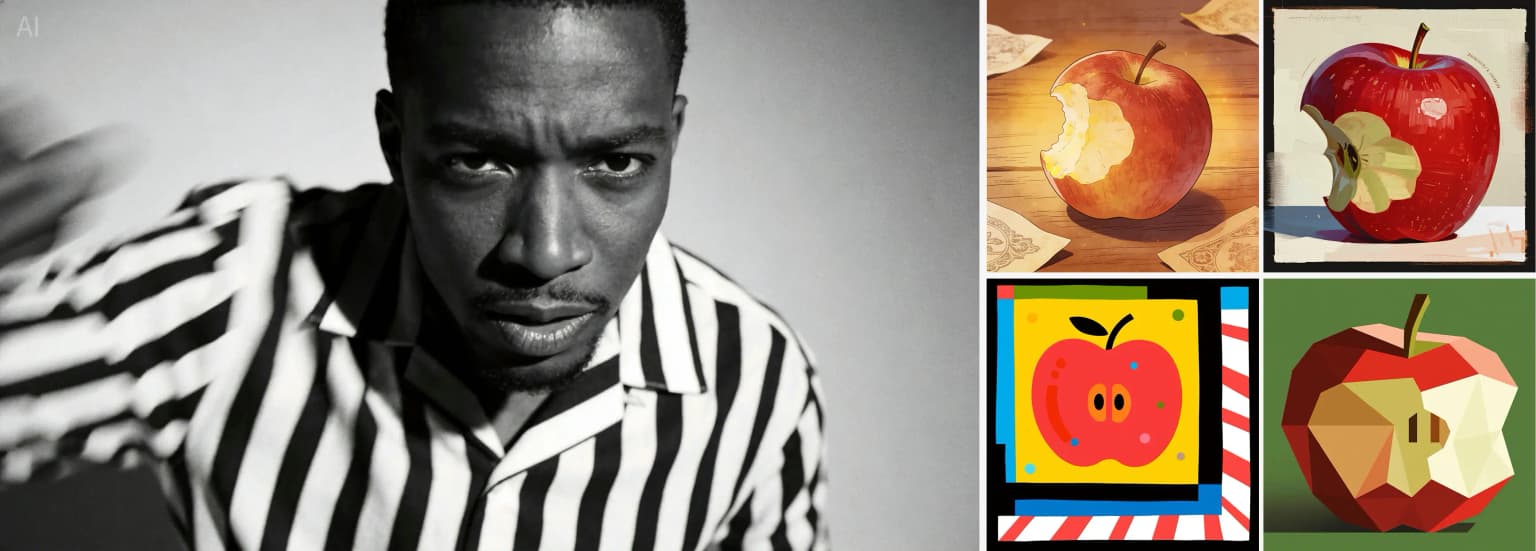
Prompt reviewed
Use the four style references on the right. Redraw the man in each referenced style and return four matching images, one image for each style.
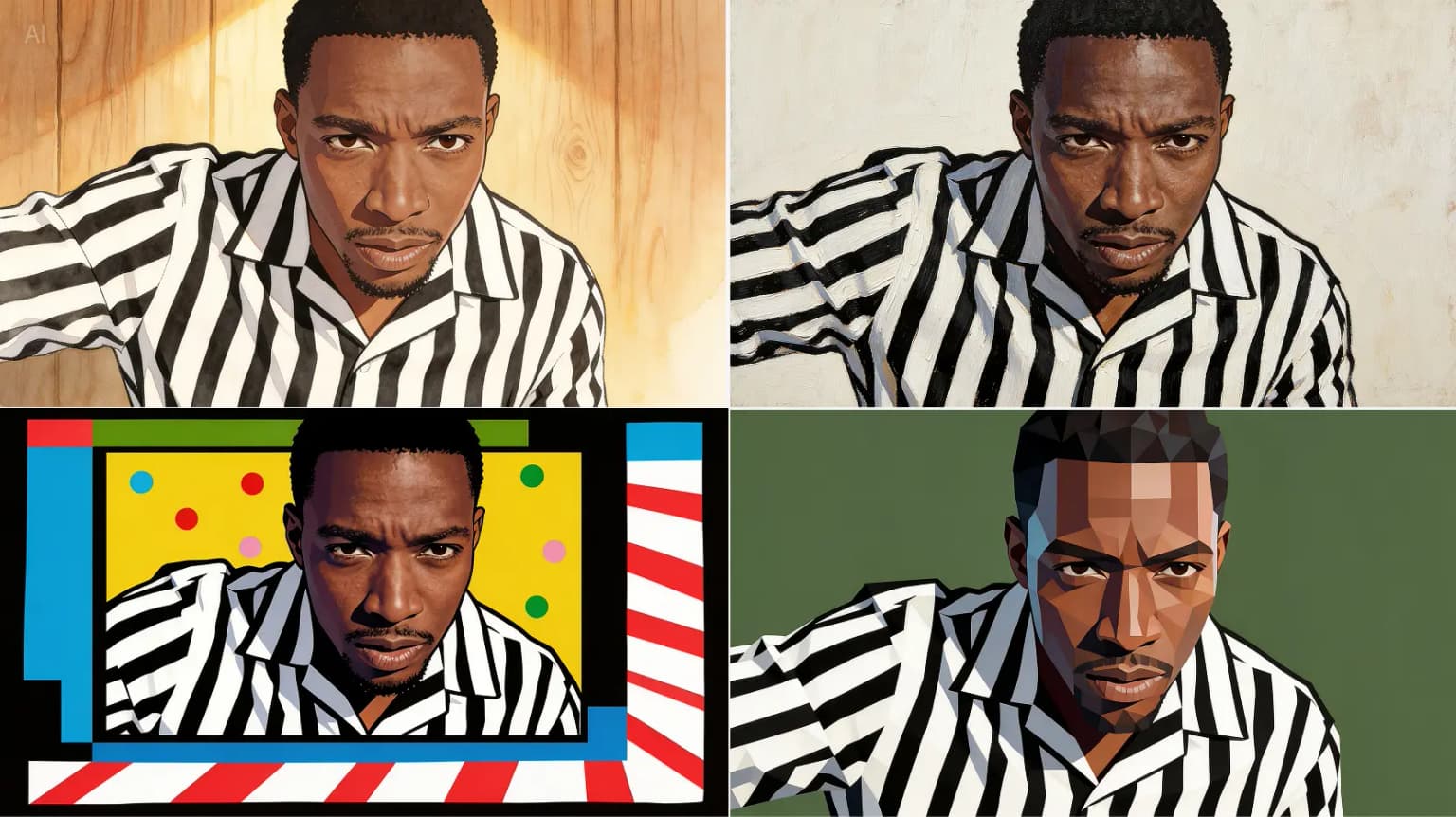
Review note
This example is useful for creators who need a character, object, or subject to stay recognizable while the visual style changes. It is the kind of workflow that matters for campaigns and design exploration.
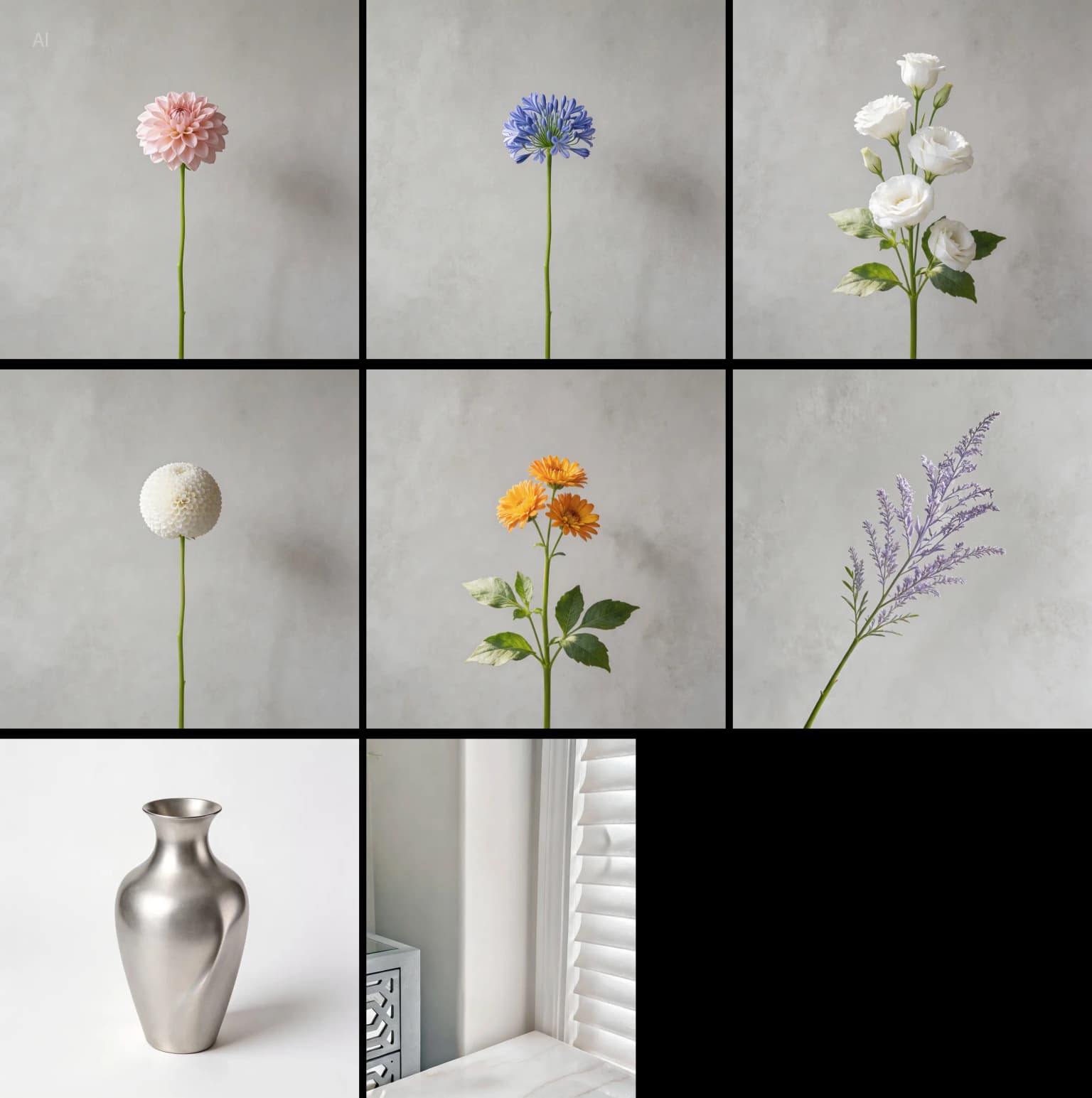
Prompt reviewed
Create a floral arrangement using the flowers from images 1 to 6. Place all flowers into the vase from image 7, then put the vase on the table from image 8.

Review note
Composite prompts are harder than single-image prompts because separate references must become one coherent final scene. This example shows why reference instructions should name the job of each input image.
Workflow review
The tool performs best when you treat it like a production workflow instead of a one-line image generator.
Seedream 5.0 Pro works best when the prompt describes the final asset, not only the visual mood. A good brief names the subject, channel, aspect ratio, output goal, and constraints. For example, a product poster should mention headline space, background, lighting, product preservation, and whether text should be included.
For credit planning, treat 2K as the draft stage and high-quality as the final stage. Use lower-cost drafts to test composition, references, text placement, and style. Move to final export settings when the image direction is already close enough to publish or send to a client.
The fastest review workflow is not to rewrite the whole prompt every time. Keep the parts that worked and change one visible problem: product size, background, text area, color palette, or pose. This makes each generation easier to judge.
Before publishing, check readable text, product accuracy, cropping, safe margins, and whether the image fits the final channel. A strong first draft still needs a human review if it will be used in ads, ecommerce listings, client work, or paid campaigns.
Feature review
The strongest use cases are commercial image tasks where references, layout, output size, and revision control matter.
Seedream 5.0 Pro is a good fit when the final output needs enough detail for product pages, posters, presentations, and campaign visuals. The important habit is to avoid using final export settings for every early draft. Save it for final images after the prompt direction is stable.
The reference workflow is one of the main reasons to use Seedream 5.0 Pro. It helps when you need to preserve product shape, style direction, a character, a scene, or a visual layout. The best results come from prompts that explain what each reference image should control.
Seedream 5.0 Pro gives practical results when the prompt is written like a creative brief. Vague prompts can still produce attractive images, but review-quality output usually needs subject, intent, composition, style, lighting, text rules, and negative constraints.
The tool is easier to understand if the user reads the prompt guide and how-to page first. It is not difficult, but users who expect one-line prompts to solve every commercial image task may need a few drafts to learn the workflow.
Pros and limitations
A useful review should make the tradeoffs easy to see. Seedream 5.0 Pro has a strong use case, but it is not the right tool for every workflow.
Pricing and value
The value depends on how you use drafts. Treat 2K as the testing stage and high-quality as the final output stage.
Seedream 5.0 Pro is strongest when one finished image can support a product page, ad, pitch deck, campaign, or client draft. In that case, a few careful drafts can be worth more than many quick random generations.
Do not spend final-output credits too early. Test subject, layout, references, and text area first. Export larger images when the image is already close to the result you need.
Skip it if you only need casual inspiration, API-first automation, or a model research page. Review the alternatives page if your workflow is closer to OpenAI, Gemini, or model comparison.
Alternatives
If this review sounds close but not exact for your workflow, compare Seedream 5.0 Pro with the closest alternatives before buying credits.
Read this if you want to compare the production browser workflow with the public model reference.
Open comparisonRead this if your team is deciding between a focused Seedream workflow and OpenAI image generation.
Open comparisonRead this if your team is comparing Seedream with a Gemini-centered image workflow.
Open comparisonFinal verdict
The clearest fit is a creator or team that needs finished visuals and wants a practical browser workflow instead of a developer-led image pipeline.
You make product visuals, ads, posters, social images, presentation graphics, concept drafts, or reference-guided creative work. Seedream 5.0 Pro is a strong fit when you want to test prompts quickly, use references, plan credits around drafts, and export final images from one browser workflow.
You need API-first integration, already work inside ChatGPT or Gemini, or want to study the model family rather than create finished assets. In that case, compare GPT Image 2, Nano Banana Pro, and Seedream 5.0 Lite before deciding.
FAQ
Short answers for people deciding whether Seedream 5.0 Pro is the right AI image generator for their workflow.
Seedream 5.0 Pro is worth testing if you need commercial AI images, product visuals, posters, social assets, or reference-guided edits from a browser workflow. It is less ideal if you mainly need API control or only want to study the model family.
It fits creators, marketers, ecommerce teams, designers, and content teams that need finished visuals without building a custom image pipeline. It is especially useful when images need references, 2K draft planning, and final exports.
Complex text, precise product details, and client-ready layouts still need human review. Like most AI image tools, Seedream 5.0 Pro works better when the prompt is specific and the user is willing to revise.
Start with one real brief: a product hero, poster, reference edit, or social ad. Use a 2K draft first, check whether the composition works, then move to final export settings only when the direction is close to final.
Seedream 5.0 Pro is a focused Seedream browser workflow. GPT Image 2 is stronger for OpenAI-native workflows and API use. Nano Banana Pro is stronger for Gemini and Google product workflows.
Use a real product, poster, or reference-edit task. Start with a draft, revise once, then decide whether the workflow fits your creative work.